7 Financial Modeling Best Practices Every FP&A Professional Must Know

If you have spent any time working in Finance and FP&A, you have at least once opened a model that made no sense.
Not because the data was wrong, but because whoever built it knew something you did not and left no trail. Financial modeling sits at the centre of everything FP&A does, from budgets and forecasts to long-range planning, and yet most Finance teams are still building models that only one person truly understands.
For years, FP&A teams have patched these problems with Excel workarounds: colour-coding conventions, tab naming rules, manual check formulas, and version-numbered files saved across shared drives. These patches work, up to a point. But they rely entirely on human discipline. The moment someone deviates from the convention, the model breaks.
Farseer was built to solve this at the platform level. Rather than asking finance teams to follow conventions, it makes the right structure the only option.
This article walks through seven financial modeling best practices and shows how a modern FP&A platform handles each one, replacing the manual Excel workarounds most teams still rely on today.
Best Practice 1: Clear and Consistent Formatting
In Excel, formatting is a pain. Someone on the team decides on a colour-coding convention blue for inputs, black for formulas, green for cross-sheet links. And then everyone has to remember it, follow it, and enforce it manually. The moment a new analyst joins, or someone works late and stops caring, the convention breaks.
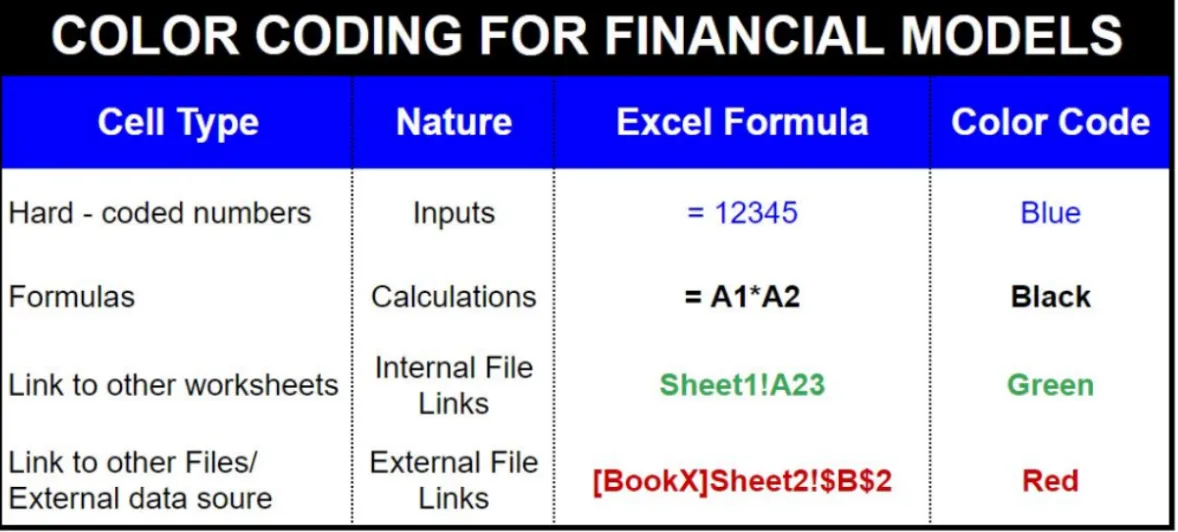
The deeper problem is that Excel relies on conventions to distinguish between an input cell and a formula cell at the structural level. They look identical unless someone has formatted them differently. A hardcoded number in a formula column is invisible until the model breaks.
| How Farseer Handles This |
| Here’s the reality: these best practices are well known. The problem isn’t knowing them. It’s consistently applying them in Excel.
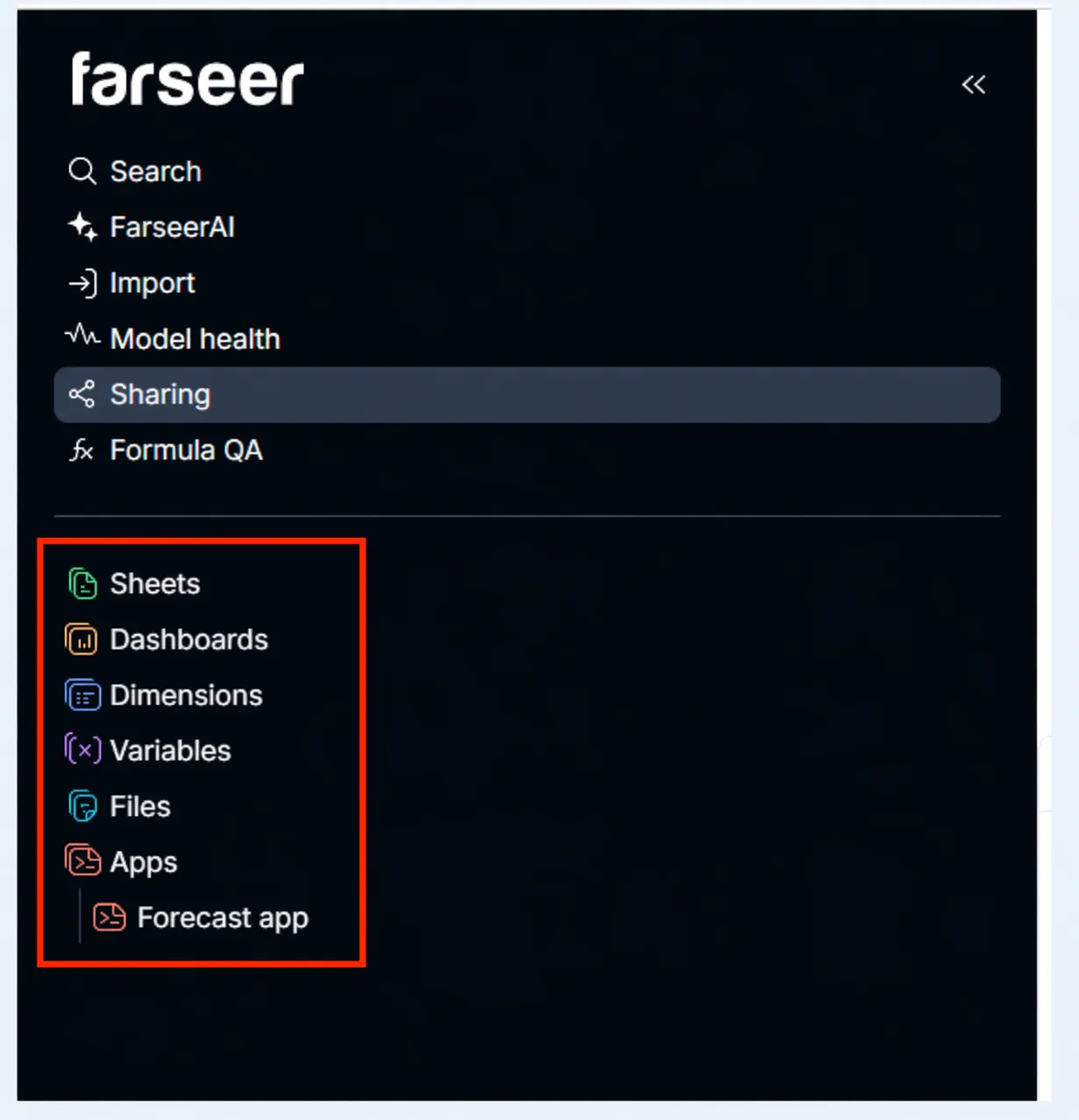
Farseer solves the formatting problem architecturally rather than conventionally. There is no need for a colour-coding system because the platform makes the distinction at the data model level. Variables in Farseer are explicitly typed input drivers. The user enters data into them. Measures are read-only calculated outputs. Users cannot manually override them. This separation is enforced by the system, not by a style guide. There is no way to accidentally type a hardcoded number into a formula cell because formula cells do not accept manual input. |
Best Practice 2: Separate Assumptions and Drivers
Nothing is worse than hardcoded numbers buried inside Excel formulas.
A formula like =B5*1.05 isn’t a model. It’s a guess. A model is dynamic. It allows you to change the growth rate in one place and watch the impact ripple through revenue, costs, and cash flow instantly.
That dynamism only works when every assumption lives in a dedicated, clearly labelled assumptions sheet.
The assumptions sheet is the control room of your model. It is the single place where a CFO, an auditor, or a new team member can go to understand what the model believes about the future.
Every macro input — growth rates, margins, FX rates, inflation, headcount targets — should sit here with its source, owner, and last-updated date clearly documented.
Read: What Is Margin Analysis and How to Conduct It Step by Step
|
How Farseer Handles This |
|---|
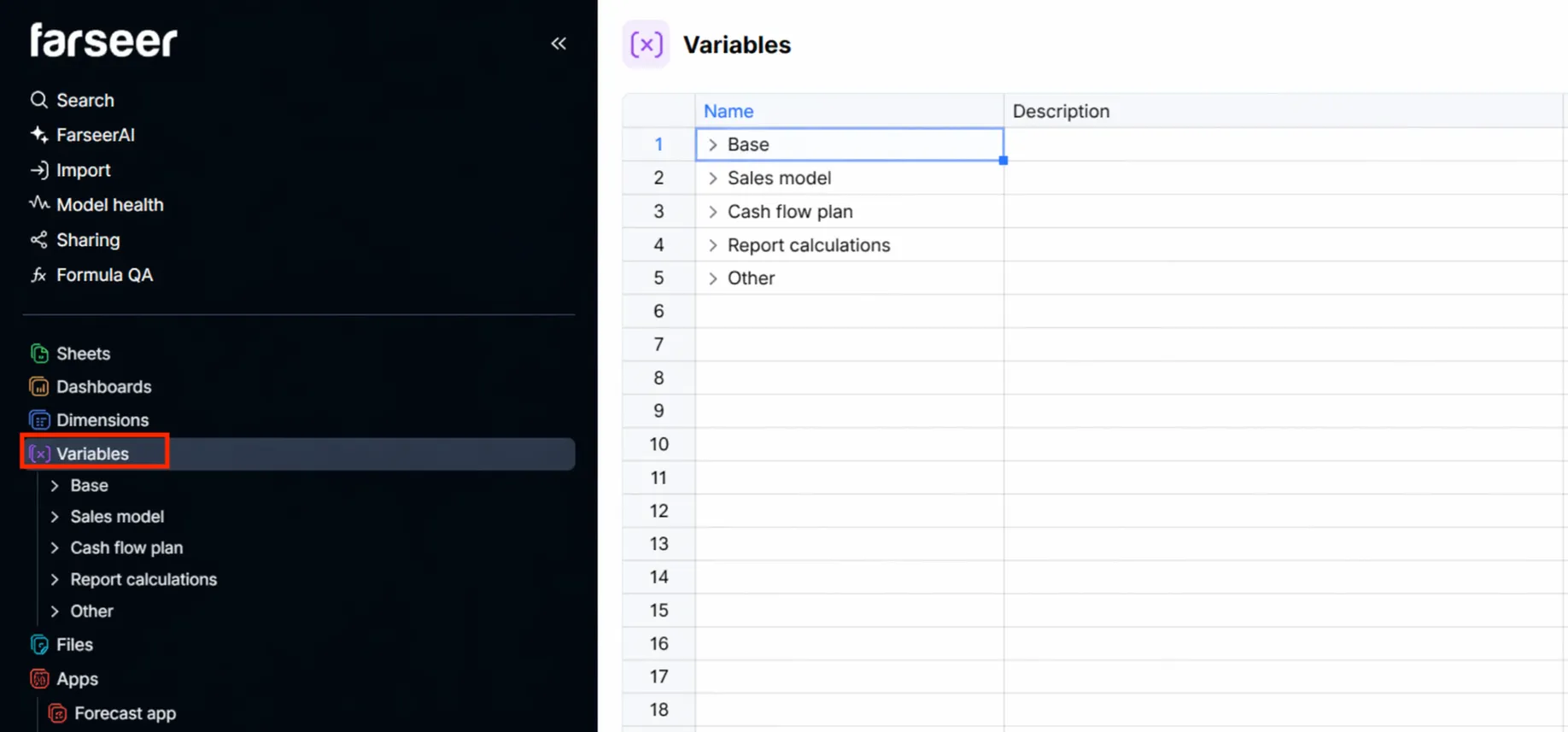
| In Farseer variables replace scattered assumption cells with a structured, dimension-aware driver layer. Change one variable and every output that references it recalculates instantly across your entire model. |
Best Practice 3: Modular Structure
Picture one enormous Excel sheet with revenue, costs, P&L, balance sheet, and scenarios all tangled together. That is the huge Excel monster most finance teams end up with. One broken link or a missed reference cascades everywhere. Troubleshooting takes hours because there is no clear separation between what feeds what.
|
How Farseer solves This |
| Farseer’s modular architecture solves this. Each module has a single purpose. It receives inputs, performs its calculations. The damage from any error is contained. Handovers are possible without a multi-hour walkthrough.
Looking at a real Farseer workspace, you see the structure immediately: Administration, OPEX & Other, Sales (with B2C and B2B as sub-modules), Other Revenue & Expenses, and Dashboards. Each sheet has one job. Unlike Excel, where a tab is just a tab and its purpose is implied by whoever named it, Farseer sheets are structured objects. |
Best Practice 4: Error Checking and Validation
In 2012, a modeling error in JPMorgan Chase’s Value-at-Risk model contributed to what became the London Whale trading loss and eventually over $6 billion.
The model had a formula that used the average of two prices instead of their sum. One formula. Billions of dollars. Financial models carry real stakes. Error checking is not optional.
In Excel, error checking is something you build on top of your model: a dedicated checks tab, IF (condition, “PASS”, “FAIL”) formulas, conditional formatting to turn cells red when something breaks. It works, but it is entirely manual. You have to build it, maintain it, and remember to look at it.
| How Farseer Handles This |
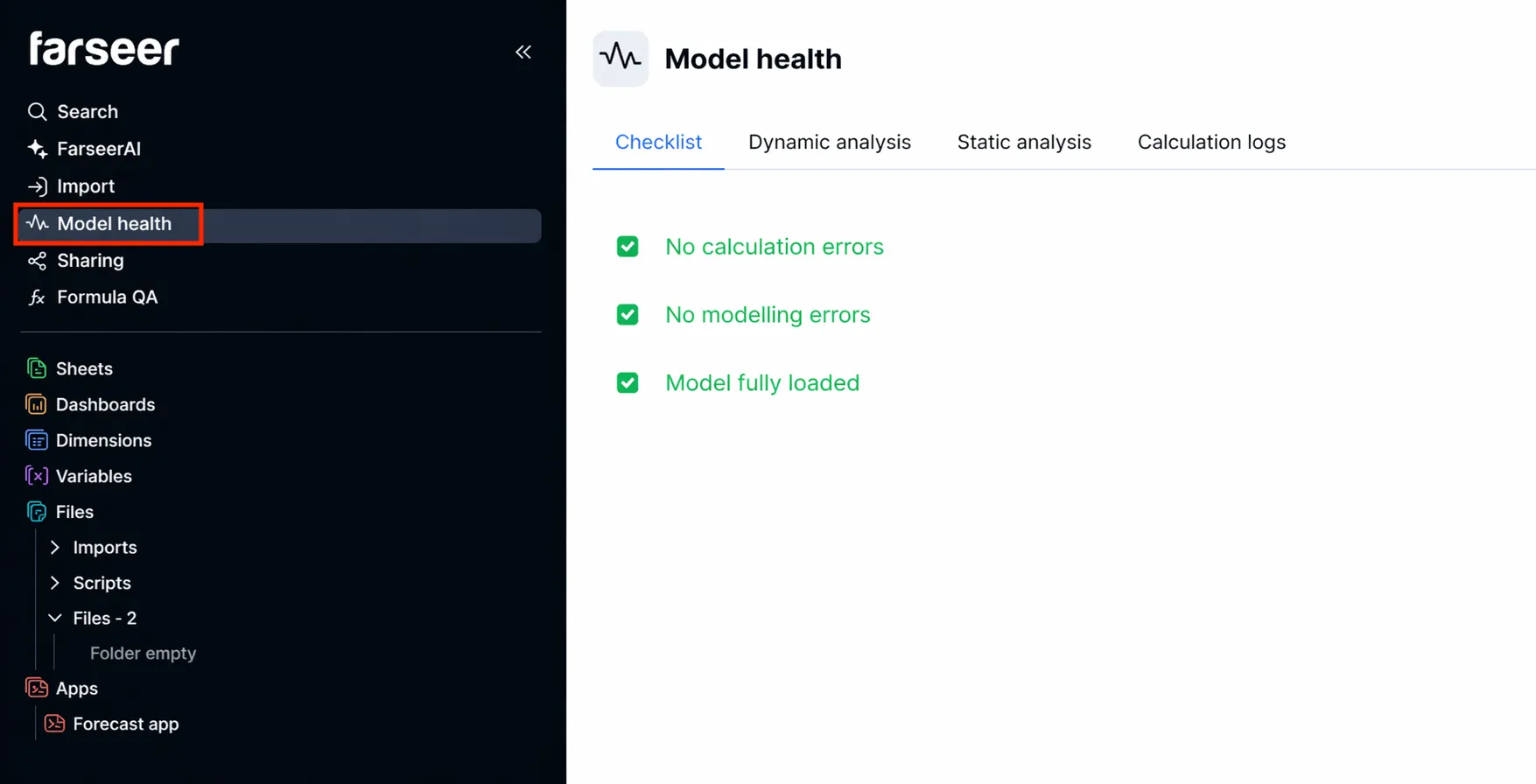
| The Farseer equivalent of running a checks tab is opening Model Health before any major model use or handover. It shows the same information you build in the manual check tab but it updates automatically. You do not have to build or maintain it. |
Best Practice 5: Scenario and Sensitivity Analysis
A single-point forecast is not a financial model. The future is uncertain, and FP&A’s job is not to predict what will happen but to help leadership understand the range of outcomes and make better decisions across that range. Scenario and sensitivity analysis are the tools that deliver this.
In Excel, running three scenarios means maintaining three versions of the same model or building a scenario selector with CHOOSE () logic and a dropdown. Either way, the moment you add a fourth scenario or change a shared assumption, you are manually updating multiple places. The risk of inconsistency is constant.
| How Farseer Handles This |
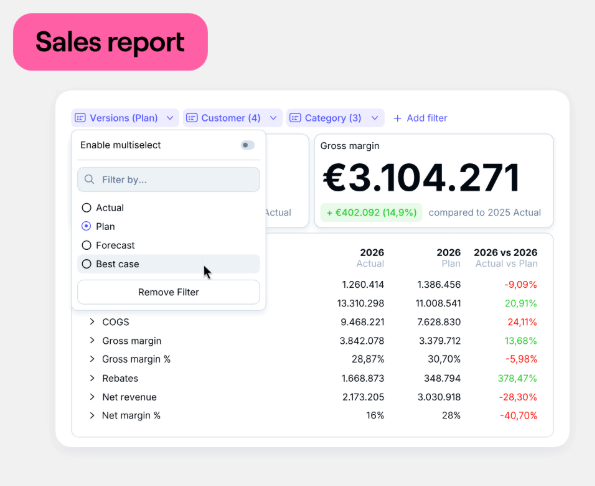
| Farseer eliminates multi-file scenario management entirely. One model. Multiple versions. Instant switching. Rather than maintaining three copies of the same model, you create one and the “Versions” handle the rest. Simulation dashboards replace static data tables with live, driver-adjustable sensitivity analysis you can explore in real time. |
Best Practice 6: Documentation and Transparency
Undocumented models are black boxes. They cannot be audited. They cannot be handed over. They cannot be updated by anyone other than their original builder. And even that person sometimes forgets the logic after three months away from the file. Documentation is not administrative overhead; it is part of the model itself.
In Excel, documentation is something you build separately: a cover sheet, inline cell comments, a changelog tab, source columns next to assumption cells. All of it requires discipline and maintenance. None of it is enforced.
| How Farseer Handles This |
| Farseer’s architecture is self-documenting in ways Excel cannot replicate. Every Variable has a name, a description, a dimension configuration, and a rollup type all visible to anyone who opens the model. There is no guessing what a cell does. You read the Variable definition.
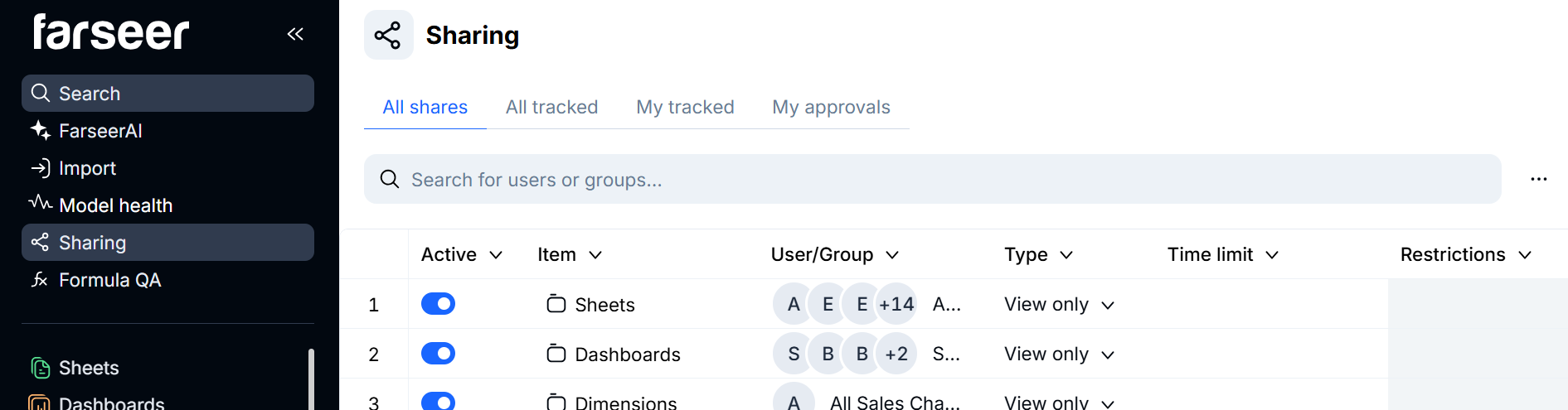
The Sharing feature controls who sees what. Rather than emailing a file and hoping the recipient does not accidentally overwrite a formula, you share a Farseer model with configured access rights. The documentation and the access control live in the same place. |
Best Practice 7: Version Control and Regular Maintenance
A budget model built in October is not the same model in March. Actuals have come in. Assumptions have been revised. The board approved a new headcount plan. New product lines were added. A model that is not systematically maintained drifts from reality — and once it drifts, it becomes worse than no model at all.
In Excel, version control is a file naming convention: ModelName_v1.0_YYYYMMDD_Initials.xlsx. It works until it does not — until someone saves over the master, or five versions of the file circulate simultaneously with no clear source of truth.
| How Farseer Handles This |
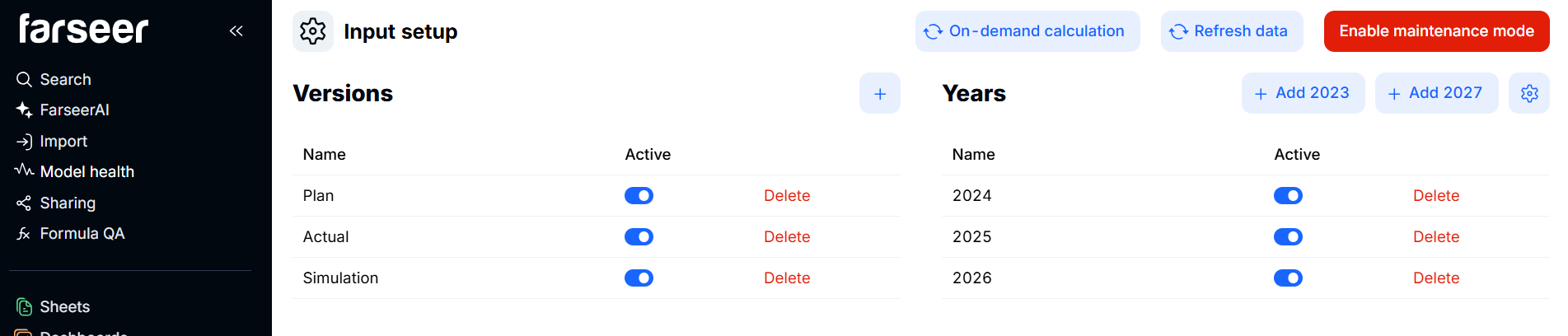
| Farseer’s Versions dimension is built-in version control. Every Variable can hold different values per Version. When actuals come in and assumptions are revised for a new planning cycle, you create a new Version and not a new file. The history is preserved. The source of truth is always the live model, not a filename. |
Financial modeling is a craft. The teams that invest in building models the right way, rather than just the fast way, are the ones whose analysis gets trusted, acted on, and remembered. Farseer does not change the craft. It removes the friction that has always stood between knowing the best practices and actually following them.

FAQ
What are financial modeling best practices?
Financial modeling best practices are structured guidelines that ensure models are accurate, transparent, and maintainable. They include clear structure, centralised assumptions, modular design, built-in error checking, scenario analysis, documentation, and version control. Platforms like Farseer implement these practices at the architecture level, removing the manual discipline that spreadsheet-based models require.
Why is financial modeling important in FP&A?
Financial modeling is the engine of FP&A. It supports budgeting, forecasting, and strategic decision-making. A well-built model helps finance teams analyse scenarios, stress-test assumptions, and present insights with confidence. A poorly structured model creates errors, erodes trust, and slows down the decisions the business depends on.
What is the most common mistake in financial modeling?
Hardcoding assumptions directly into formulas. This makes the model inflexible, impossible to audit, and prone to silent errors. The fix is to centralise every assumption as a named, referenceable driver which is exactly what Farseer Variables are designed to do.
How does Farseer differ from Excel for financial modeling?
Excel is a calculation tool adapted for financial modeling through manual conventions. Farseer is purpose-built for FP&A. The key differences: assumptions are structured Variables not free-form cells, scenarios are native Versions not copied files, error checking is built-in through Model Health.
What is a modular financial model?
A modular model separates its components into self-contained units — revenue, costs, P&L, scenarios — each with a single purpose. In Farseer this is the default architecture: each sheet handles one function and exposes its outputs through Variable references that other sheets consume.
How does Farseer handle scenario analysis?
Through the Versions dimension. Base, Best, and Worst scenarios are Versions and not separate files or formula branches. Switching scenarios is instant. Every Variable that has version-specific values updates simultaneously, with zero risk of inconsistency between cases.
What is the Farseer equivalent of an error checks tab?
Model Health and Formula QA, both accessible from the top navigation. Model Health monitors structural integrity continuously. Formula QA lets you inspect and validate any calculation chain. Neither requires you to build or maintain check formulas. They are always on.
How does Farseer handle version control?
Through the Versions dimension and the Files import history. New planning cycles become new Versions and not new files. Every data import is logged in the Files section with its source and date. The single live workspace is always the source of truth.
Can Farseer replace Excel for financial modeling entirely?
Yes, for FP&A use cases budgeting, forecasting, driver-based planning, scenario analysis. Farseer is designed to be the primary planning environment. Excel files can still be imported as data sources but the modeling, analysis, and presentation all happen inside Farseer.
How do FP&A teams get started with Farseer?
The fastest path is a live demo with a real data set from your business. Visit farseer.com to book a session. The Farseer team will walk through your current model structure and show how each component maps to Farseer’s architecture.

Digital Transformation in Finance: How Finance Teams Break Out Of Digital Planning Purgatory With AI
Read more
Farseer raises $7.2M Series A to build the Enterprise Operating System for Finance
Read more