

Financial modeling is the foundation of business planning, and the main process of translating operational assumptions (sales volumes, cost structures, or hiring plans) into financial outcomes. These models help companies project revenue, costs, cash flow, and profitability, enabling smarter decisions on budgeting, investments, and risk management.
As companies grow, modeling needs become more complex:
- Multiple contributors across departments
- Models built at the SKU, region, or cost center level
- Frequent updates and scenario planning (not just annual budgeting)
- Consolidation across multiple entities, currencies, or markets
When complexity increases financial modeling these tools help finance teams move faster, reduce errors, and plan with more accuracy. But with so many platforms on the market, it’s hard to know what’s actually useful and what’s overkill.
In this blog, we’ll look at the 7 best financial modeling tools available today, what problems they solve, where they work best, and how to choose the right one based on your size, structure, and planning needs.
Read FP&A Software for Modern Finance Teams: Compare the Best Tools in 2026
Financial Modeling Tool Types with Examples
There’s no single category called “financial modeling software.” Instead, the market is split across several types of tools, each solving different parts of the planning problem. Here’s how they break down:
1. Spreadsheets (Baseline Tools)
Examples: Microsoft Excel, Google Sheets
Strengths:
- Familiar and flexible
- No implementation needed
- Powerful for ad hoc models and small teams
Limitations:
- No audit trail or user controls
- Collaboration is manual (version chaos)
- High risk of errors
- No automation or system integration
Best for:
- Small companies or startups
- Teams with fewer than 5 users and limited complexity

2. Spreadsheet-Native FP&A Overlays
These tools keep Excel as the interface but add structure and automation underneath.
Examples: Cube, Datarails, Vena
Strengths:
- Keeps Excel as the front-end
- Adds data integration, workflow, and version control
- Automates consolidation and reporting
Limitations:
- Still depends on Excel formulas and files
- Limited flexibility for complex modeling logic
- Struggles with high-dimensional data (e.g., thousands of SKUs)
Best for:
- Mid-sized companies that want to keep Excel but reduce errors and manual work
- Teams doing monthly reporting or annual budgeting with moderate collaboration needs
3. Modern Cloud FP&A Platforms
Cloud-native platforms built specifically for planning, modeling, forecasting, and collaboration.
Examples: Farseer, Abacum, Planful, Pigment, Jedox
Strengths:
- Built for finance teams, not IT department
- Real-time collaboration with audit trails
- Scenario modeling, driver-based planning, and rolling forecasts
- Can integrate actuals from ERP, CRM, and HR systems
Limitations:
- Requires onboarding and some process change
- Varying flexibility and ease of use between vendors
- Some lack deep industry-specific logic out of the box
Best for:
- Mid-market companies with 10+ planners, multiple entities, or markets
- Teams that need structured workflows, rolling forecasts, and fast scenario analysis
- Companies outgrowing spreadsheets but not ready for heavy enterprise platforms
4. Enterprise-Grade FP&A Suites
Large-scale platforms designed for global enterprises with complex compliance and consolidation needs.
Examples: Anaplan, Oracle Hyperion, SAP BPC/SAC, Workday Adaptive Planning
Strengths:
- Deep integration, controls, and governance
- Advanced modeling and financial consolidation
- Enterprise-level security and auditability
Limitations:
- High cost and long implementation timelines
- Requires dedicated IT or admin support
- Often too rigid and complex for mid-sized companies
Best for:
- Enterprises with large finance departments
- Multinational groups needing statutory consolidation, compliance, and high-scale complexity
Read more: Why Enterprise Software Should Start With Finance and Expand From There
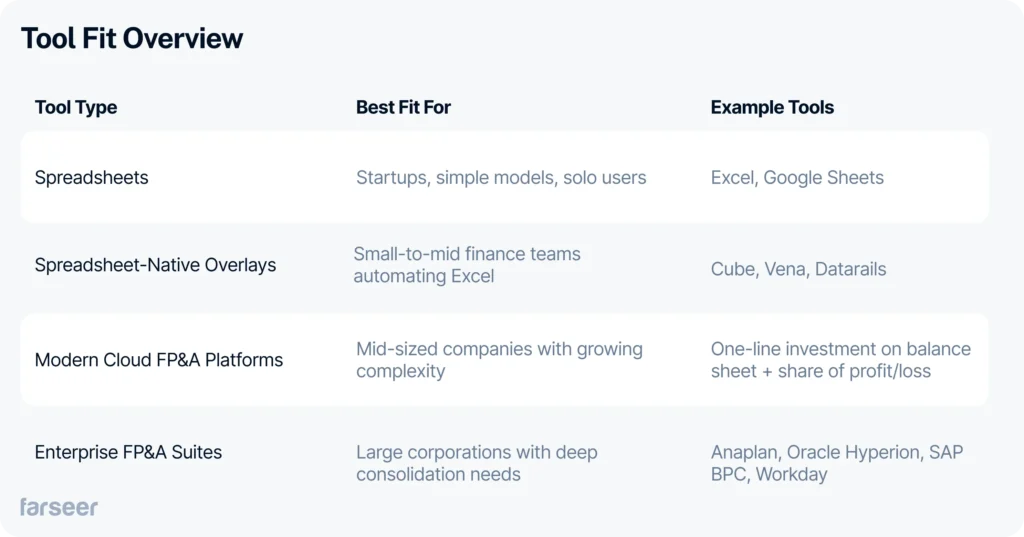
Tool Fit Overview
Tool-by-Tool: Where Each Financial Modeling Platform Fits
Every tool on this list has strengths, and none are one-size-fits-all (or at least most of them aren’t). What works well in a SaaS startup may fall short in a distribution business with thousands of SKUs. Here’s a practical look at where each platform fits, and what to consider if your planning needs go beyond its core use case.
1. Excel

Best for: Small teams, early-stage companies, or simple models
Excel remains the starting point for nearly everyone. It’s powerful for ad hoc modeling, highly flexible, and accessible to everyone. But as soon as planning becomes cross-functional, frequent, or granular (e.g., by SKU or region), spreadsheets start creating friction.
If planning is becoming more structured or time-sensitive, relying solely on Excel makes it harder to maintain accuracy and visibility.
2. Farseer
Best for: Companies with operational planning complexity that don’t want enterprise-level overhead
Farseer is designed for companies that have outgrown spreadsheet-based planning but don’t want to commit to the cost, timelines, and rigidity of enterprise FP&A suites. It’s used primarily in operationally complex environments, like manufacturing, distribution, and pharma, where planning happens across SKUs, regions, cost centers, and legal entities.
Instead of managing dozens of disconnected files, teams work in one centralized model that connects actuals with forecasts in real time. This makes it easier to:
- Plan at SKU, customer, or territory level
- Run rolling forecasts throughout the year
- Track plan vs. actuals without manual consolidation
- Collaborate across finance, sales, and operations with full transparency

Farseer is typically chosen by finance teams that want:
- Full ownership of their models without IT dependency
- Fast implementation measured in weeks, not months
- The flexibility to adapt models as the business changes
- Enough structure to handle complexity without slowing the team down
It’s a strong fit for companies that sit between two extremes: spreadsheets that no longer scale, and enterprise platforms that require heavy administration.
3. Vena

Best for: Teams that want to keep using Excel, but with more control and automation
Vena adds structure on top of Excel: centralized data, workflows, and approvals. For companies running annual budgets with stable templates, it brings helpful discipline without requiring a full system switch.
But when models change often, or when planning needs to drill into more complex operational layers (like SKU-level margins or territory-based sales plans), Excel-based logic becomes harder to manage.
Read 7 Vena Alternatives and Competitors to Take a Look at in 2026
4. Cube

Best for: Fast-growing teams looking to improve visibility and reduce spreadsheet chaos
Cube, one of financial modeling tools, syncs Excel and Google Sheets with centralized data, enabling real-time updates and reporting. It’s a strong fit for teams that want to improve the quality of existing spreadsheet models without disrupting how people work.
For companies that plan across products, entities, or departments, and need deeper modeling flexibility, it may become harder to scale logic across scenarios or manage input complexity.
5. Abacum

Best for: Mid-sized SaaS and tech companies prioritizing fast collaboration
Abacum focuses on usability, integrations, and rolling forecasts. Its intuitive interface works well in high-growth environments where finance acts as a business partner, updating plans frequently and sharing dashboards with stakeholders.
In more operationally complex businesses, like manufacturing or pharma, teams often need more modeling depth than predefined templates or dashboards can offer.
6. Planful

Best for: Mature mid-market organizations building structured FP&A processes
Planful supports consolidation, standardized workflows, and broad planning coverage. It’s well-suited for teams that want formal processes and tighter governance.
However, with that structure comes complexity: implementation takes longer, and maintaining models may require admin-level skills. Businesses with limited resources or frequently changing planning logic may find it less agile.
Read 6 Planful Competitors Finance Teams Should Consider in 2026
7. Anaplan

Best for: Enterprises with large teams and advanced, cross-functional planning requirements
Anaplan is built for scale. It can handle multi-year forecasting, connected planning across departments, and high data volumes. For global enterprises, it delivers the depth and control needed to unify planning across silos.
That same power comes with overhead. It’s typically not a fit for mid-sized companies that need faster rollouts, lighter admin needs, or more flexible modeling with smaller teams.
Read Anaplan Competitors – The 6 Best Alternatives for Enterprise FP&A
The Point Where Planning Either Scales or Breaks
Financial modeling is about enabling decisions at speed and with confidence. As complexity grows, so does the cost of relying on spreadsheets that weren’t built to handle collaboration, scale, or operational depth.
If your planning process is starting to feel like more coordination than analysis, too many files, too many workarounds, it’s time to re-evaluate the tools behind it.
You don’t need a full enterprise suite to fix it. Tools like Farseer give mid-sized companies the structure and scale of a modern platform, with the flexibility and ownership finance teams actually need.
Start small: choose one use case, like a rolling forecast, SKU-level sales plan, or OPEX model, and test how the tool handles your reality. That’s the fastest way to move from reactive to in control.
The right tool isn’t the one with the most features. It’s the one your team can use with confidence, and that makes your planning faster, more accurate, and easier to scale.
Đurđica Polimac is a former marketer turned product manager, passionate about building impactful SaaS products and fostering connections through compelling content.